Lighthouse and scanners grade public pages. What your customers pay for lives behind the login: dashboards, settings, forms.
→ /login
Your application is a labyrinth.
Marble Minotaur walks all of it, login included.
Marble Minotaur signs in with a real account, opens every screen behind the login page and hands you, in about twenty minutes for sixty screens, a sorted list of what breaks, what threatens, and what holds.
- screens opened in 16 min 58 s
- 60
- documented checks
- 311
- screen sizes per page
- 3
- lines of code to install
- 0
→ /dashboard(1/60)
Your users find the bugs before you do.
Not on the home page: behind the login, where they work. A dashboard that loads forever, a button that has called nothing since the last release, a form you cannot read on a phone. Nobody saw it, because nobody walked through everything.
- They click, nothing happens. real click · no reaction
- A spinner never goes away. skeleton still there after 8 s
- A screen takes 13.9 s to show up. measured screen by screen
- On mobile, they miss the button. targets under 44 px at 375 px
Audits stop at the door.
Your tests check what you planned.
Not the screen added last week, not the tablet, not the button whose call changed. A test only finds what someone thought to write.
Manual QA cannot cover everything.
Sixty screens in three sizes at every release takes days. You test what changed, not what broke next to it.
Automated tools cry wolf.
A thousand alerts in no order, the same defect counted thirty times. The team stops reading, and the real problem slips through with the noise.
The cost shows up elsewhere: support tickets, a demo that goes off the rails, a security review that lands the week of the signature.
→ blind-spots
Each tool sees part of the labyrinth.
Marble Minotaur replaces neither your tests, nor your QA, nor a full audit: in under an hour it sees what they miss, and tells you where they fall short. It does not read your code; that is an audit’s job.
| Practice | Behind the login | Every screen, no list to maintain | Three screen sizes | Every network call | Defects grouped, fixes ordered | A document you can hand over | What was not tested, stated | Code and server | A result within the hour |
|---|---|---|---|---|---|---|---|---|---|
| A page scanner (Lighthouse, SEO tools) | no | partly | partly | no | partly | partly | no | no | yes |
| Your end-to-end tests | yes | no | partly | partly | no | no | no | no | yes |
| Manual QA | yes | partly | partly | no | partly | partly | no | no | no |
| Production monitoring | yes | partly | partly | yes | no | no | no | partly | yes |
| An audit by a consultant | yes | partly | partly | partly | yes | yes | partly | yes | no |
| Marble Minotaur | yes | yes | yes | yes | yes | yes | yes | no | yes |
sees it partly, or if someone thinks of it does not see it
“Every screen”: up to the limit you set. Whatever stays out of reach is listed in the report, never left unsaid.
→ the-film
One run, in ninety seconds.
→ [auth]
How a run unfolds.
Five stages, always in this order. You are only needed for the first one.
-
Step 1 : You give me an address and a test account.
It signs in like an ordinary user, through the real login form. If the session drops along the way, it signs back in and resumes where it left off.
$ npx marble-minotaur https://app.exemple.fr --auth … --forms[auth] Authenticating as test@granit.local...[auth] ✓ Authenticated : landed on /dashboard[crawl] → /dashboard (1/60) ✓ 3568ms 17 links[crawl] → /projects (4/60)[crawl] Session lost before /projects, signing back in[auth] ✓ Authenticated : landed on /dashboard[crawl] → /projects/:id/checks/:id (5/60)[crawl] Loading indicator never cleared after 8052ms ✓ 10662ms 18 links 1 form ⚠ 1 issue -
Step 2 : It walks the application, room by room.
It moves breadth-first and recognises screens that look alike:
/projects/42and/projects/73are the same room, visited once. Each colour is what it found there.On this site’s sample, 60 screens opened in 16 min 58 s. The audited application, Granit Golem, is another of my projects: run as is, with no touch-up before or after.
from the film · the labyrinth of 60 screens -
Step 3 : It checks every screen from every angle.
311 checks across 11 families: security, accessibility, performance, experience, network, forms, compliance. Every screen in three sizes, every network call read one by one.
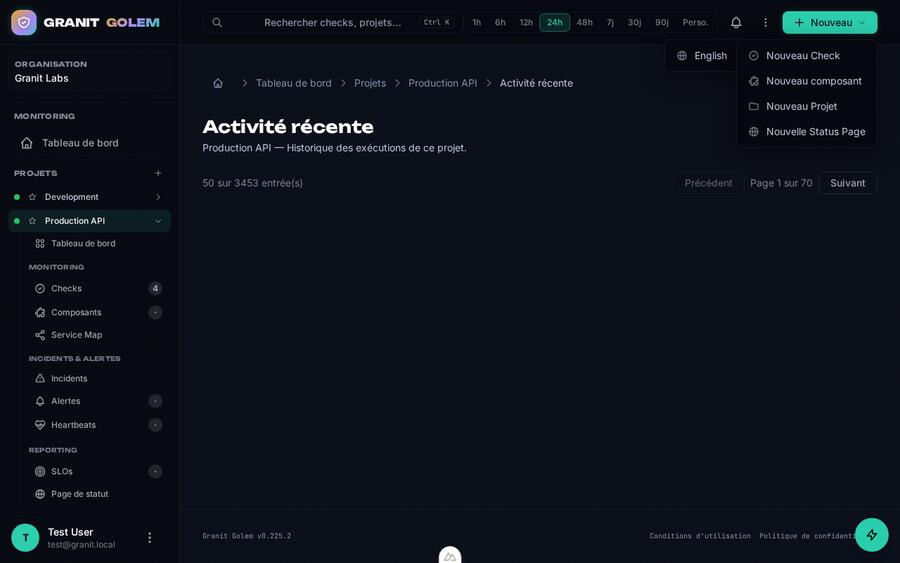
1280 · desktop 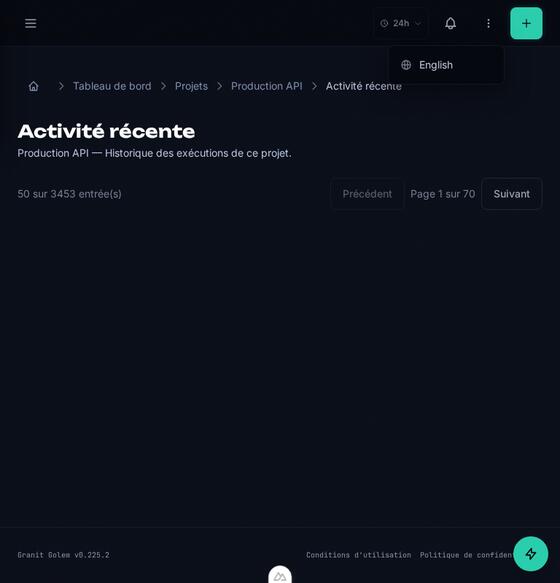
768 · tablet 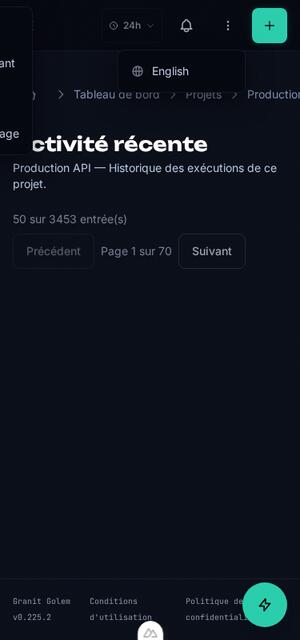
375 · overflows by 64 px /projects/:id/activity · 5 targets too small for a finger
-
Step 4 : It sorts, links and ranks.
A defect on thirty screens is not thirty tickets: it is reported once, with the list of screens affected. Defects that together open a door are linked into one risk: a missing header and a readable cookie make a session hijack.
Then fixes are ranked by what they solve: the most worthwhile first.
1,013findings recorded66families to fixOn an application larger than our sample.
-
Step 5 : You receive a report the team reads.
A file that opens offline and travels by email. It starts with the verdict, says what to open first, and for each defect what it makes possible and how to fix it.
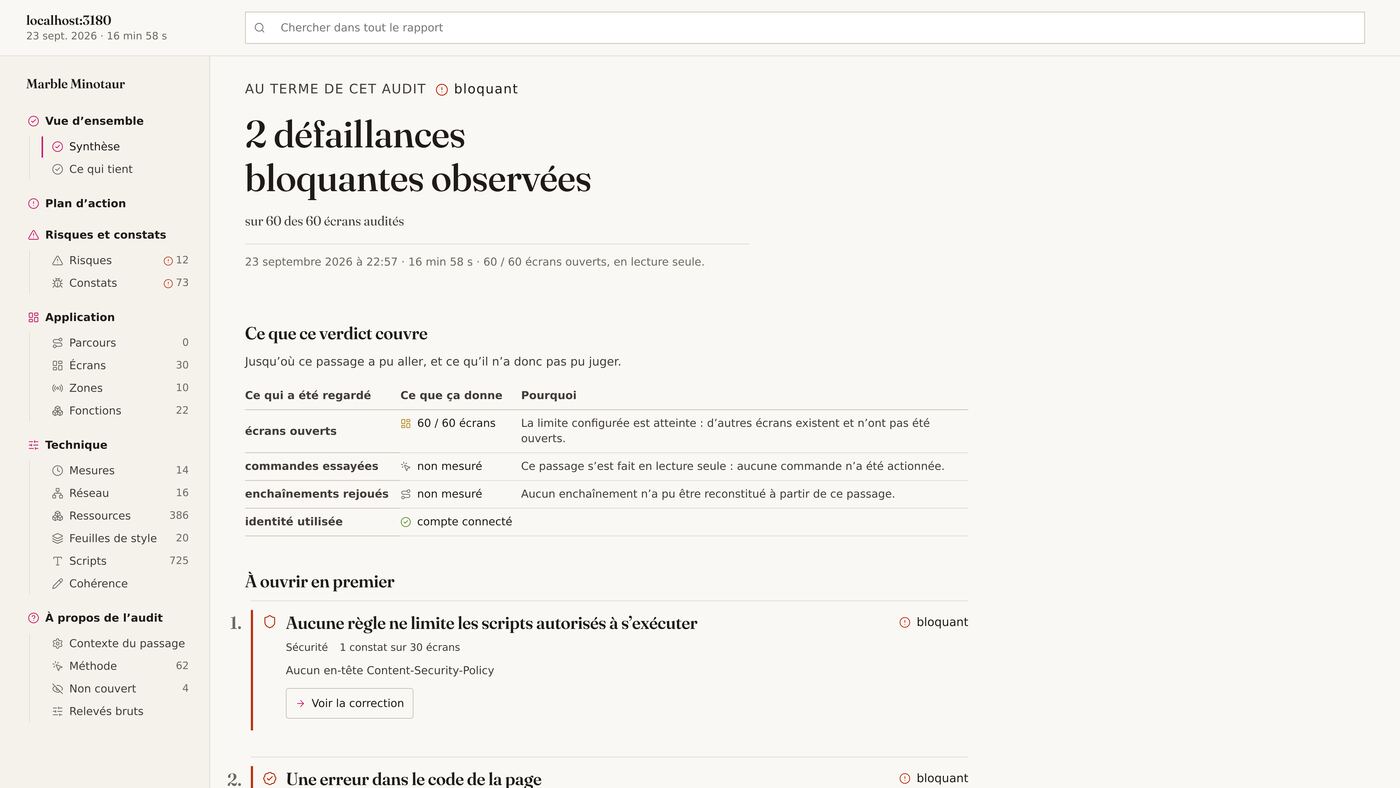
The summary of the sample run (report in French).
Send the Minotaur into your app First run free, walk-through included.
→ /en/audits
311 checks, in plain words.
Each check is a sentence a project manager understands (“No rule limits which scripts may run”), followed by its technical name for the team, an example, the risk and how to fix it.
Network 61 Calls between the browser and the server: count, weight, responses. Security 53 What protects data and sessions from a third party. Performance 49 How long the page takes to show up and respond. Accessibility 31 What lets everyone read and operate the page, assistive technology included. Stability 26 What holds through an outage, a reload or a deep link. Quality 23 General upkeep: text, images, links, consistency across screens. Experience 19 What people see and touch: screen sizes, gestures, tap targets. Search 18 What search engines understand of the page. Governance 16 Consent, legal notices and the rules the application must keep. Stack 8 The components, versions and tools the page ships. Forms 7 What forms ask for, check and answer.
→ /projects/:id/components/new
It measures what it costs your users.
Measurements taken during the run, compared with a threshold. What holds is stated as clearly as what breaks.
4.7× the threshold 236ms during which the page ignores clicks
worth watching 4.9MB of JavaScript downloaded on first visit
worth watching 12/60 screens that overflow on a phone
within threshold 5ms for the server’s first response
within threshold 0.000 of layout shift while loading
→ marble-report.html
It all fits in a single file.
An expert’s report, not a dashboard: it reads top to bottom, gets forwarded, gets printed. Reports are written in French today.
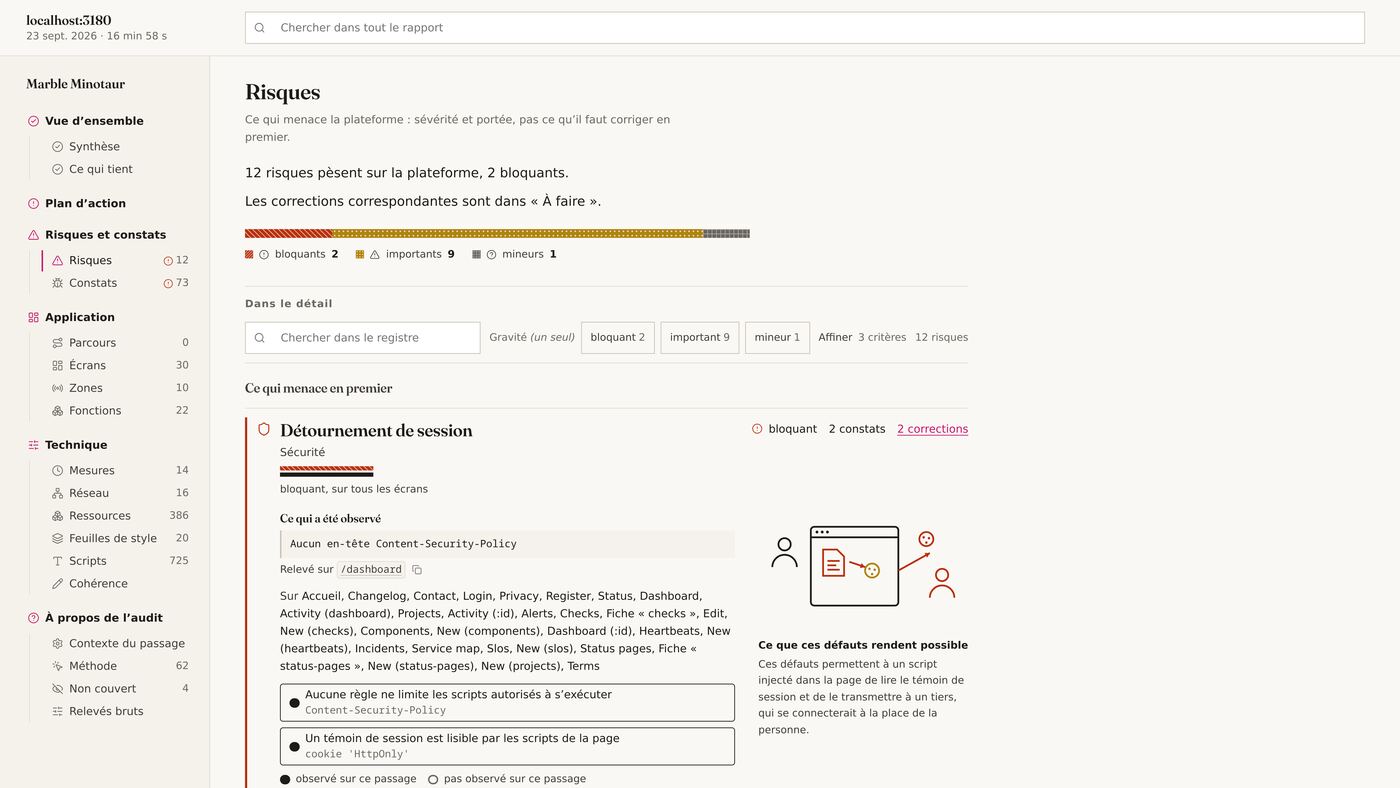
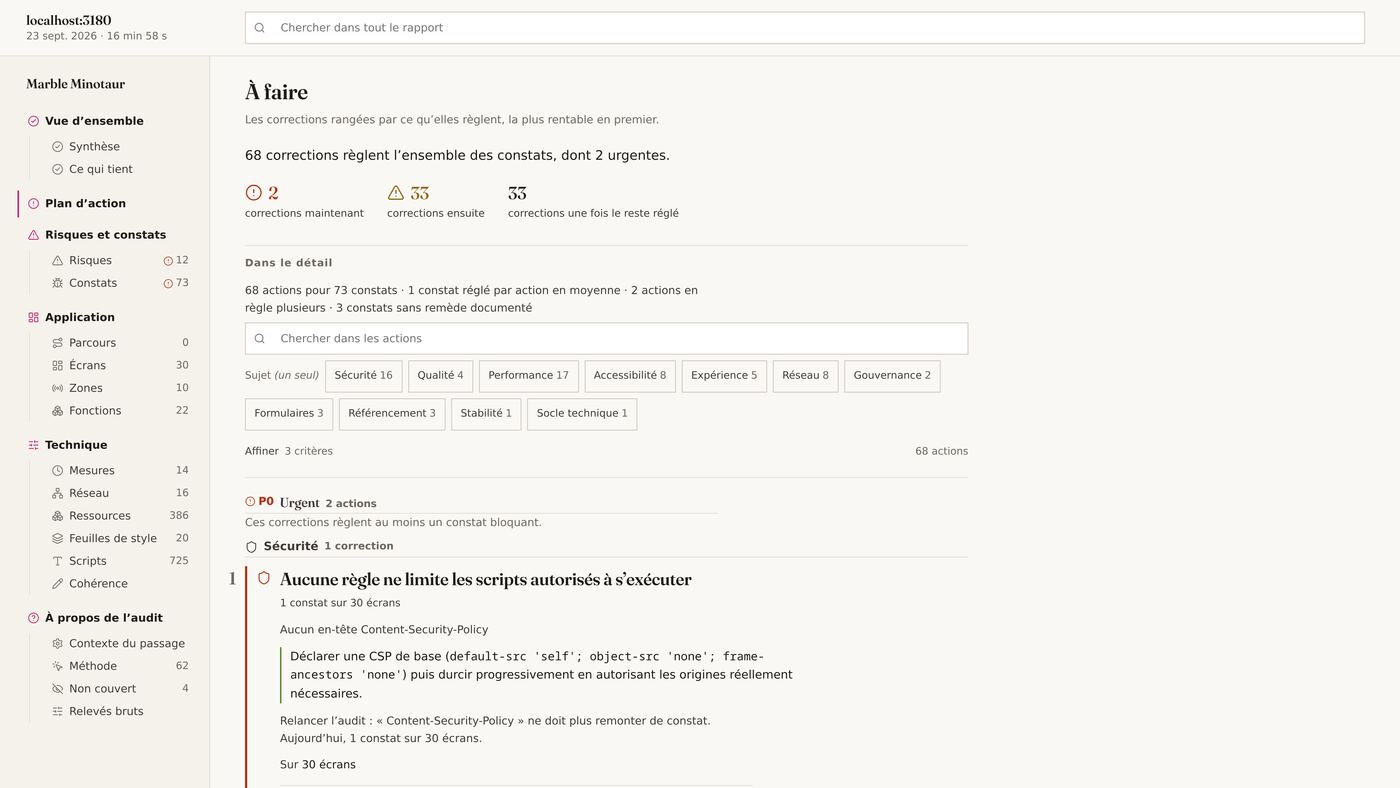
Written for the team
Every defect is a plain sentence; the technical name comes after, for whoever needs it.
Sorted by what matters
Now, next, once the rest is done. Each fix says how many screens it repairs.
It says what holds
Functions seen working, checks passed, the platform recognised: not only the defects.
Honest about its limits
What was not tested is written as such, never counted as a pass. Our own failures are never blamed on you.
observed on this run inferred from what was seen not tested, and said so
→ --probeon request
It comes into your house. Here is what it never does.
- No access to the code
- Everything happens from the outside, like a user. Nothing to install, no framework required.
- Read only by default
- It opens, looks and measures. Clicking buttons or submitting forms only happens if you allow it.
- Never deletes
- No delete request is ever sent, whatever the setting. A label like “Delete” or “Cancel subscription” is never clicked.
- No account created behind your back
- Sign-up forms are recognised and left alone, unless explicitly requested.
- A bounded budget
- Number of screens, duration and replayed journeys are capped. It stops when told to, and writes down what it did not see.
→ /your-application
When to run it.
Before a release
The release ships on Friday. Tests are green, QA saw the new features. Nobody reopened the forty screens that did not change.
You leave with the list of what breaks, ranked by urgency, and what your tests did not cover.
Before buying or taking over an application
You inherit a product you did not build. Before reading the first line of code, know what it really does and what threatens it.
You leave with an independent, screen-by-screen assessment you can put to the seller or the outgoing vendor.
When delivering to a client
Agency or contractor, you hand over an application. The report proves what was checked, and on what.
You leave with a document that reads without you and says what holds as much as what breaks.
To follow an application over time
Two runs compare: lost functions, journeys that no longer chain, resolved findings.
You leave with what appeared, disappeared or degraded from one release to the next.
→ /en/about
Made by someone who does audits.
I am Cédric, web and API architect at siliceum, in Nantes, France. Marble Minotaur automates what I have checked by hand for ten years whenever I am handed an application I do not know. I build it on my own, and I read every report it produces for you.

Cédric Chariere Fiedler President and CTO Web and API architect: reliability, performance, QA Nantes
siliceum has worked for: Asobo Studio · Euromaster · Michelin · Arturia · CAE · Limagrain
→ questions
What people ask me before a first run.
Do we need to install anything in our application?
No. Marble Minotaur works from the outside, in a real browser, like a user. No script to add, no access to the code, no framework required: Vue, React, Angular, Laravel or server rendering, it sees what your users see.
How long does a run take?
On our sample, 60 screens were opened in 16 min 58 s. The report is ready when the run ends; I read it before sending it, then we go through it together for half an hour.
Is it risky for our data?
By default it only reads: it opens, looks and measures. Real clicks and form submissions only happen if you allow them, and no delete request is ever sent. I recommend a staging environment and a dedicated test account, sent separately, never by email.
What is in the report, and can we share it?
A self-contained HTML file that opens offline: verdict, risks, action plan, screens, functions, measurements. It may contain HTTP headers and screenshots of your application; a light version strips headers, responses and screenshots before you pass it around.
How is it different from Lighthouse or an SEO scanner?
Those tools grade one public page at a time. Marble Minotaur signs in, walks the whole application, compares what it sees across screens (call shapes, templates, consistency) and folds repeated defects into fixes. It also says what holds, and what it could not test.
Does it replace our tests or our QA?
No: it shows them where to look. It finds what nobody thought of testing, and its map of observed functions shows where your end-to-end tests are missing. You can run it at every release and compare two runs.
How much does it cost?
The first runs are free, in exchange for your feedback on the report. After that, a run is priced on the size of the application and the scope (read only, forms, active probes). Write to me, I answer quickly.
Our application uses two-factor authentication or SSO. Does it work?
Form-based sign-in is detected on its own. Two-factor authentication or SSO need some setup: usually a test account without a second factor, or a session prepared by hand before the run.
Who sees our data?
Only me. The report is handed to you and is not meant to be kept; a non-disclosure agreement can be signed before the run if you wish.
Can we run it ourselves?
Not self-serve yet: for now I run every pass and read every report. That is also how a false positive gets caught before it reaches you.
Is the report available in English?
Not yet: the report is written in French. The walk-through can be held in English.
→ exit
It goes where the others stop.
The journey only starts on request. Send me three things, you receive the report.
- The address of the application, preferably a staging environment
- An account a test account with ordinary user rights
- The scope read only, or forms and clicks allowed
What happens next
- You send me the address and the scope. The test account comes separately, never in the email.
- I run it and read the report before sending it to you.
- We go through it together, half an hour on a call, so your team knows where to start.
The first runs are free, walk-through included, for teams willing to tell me afterwards what the report was missing.